

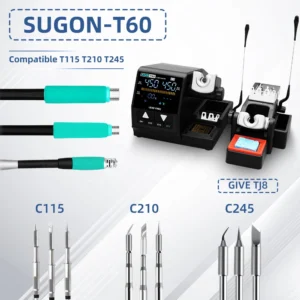
JBC-Compatible Cartridge System
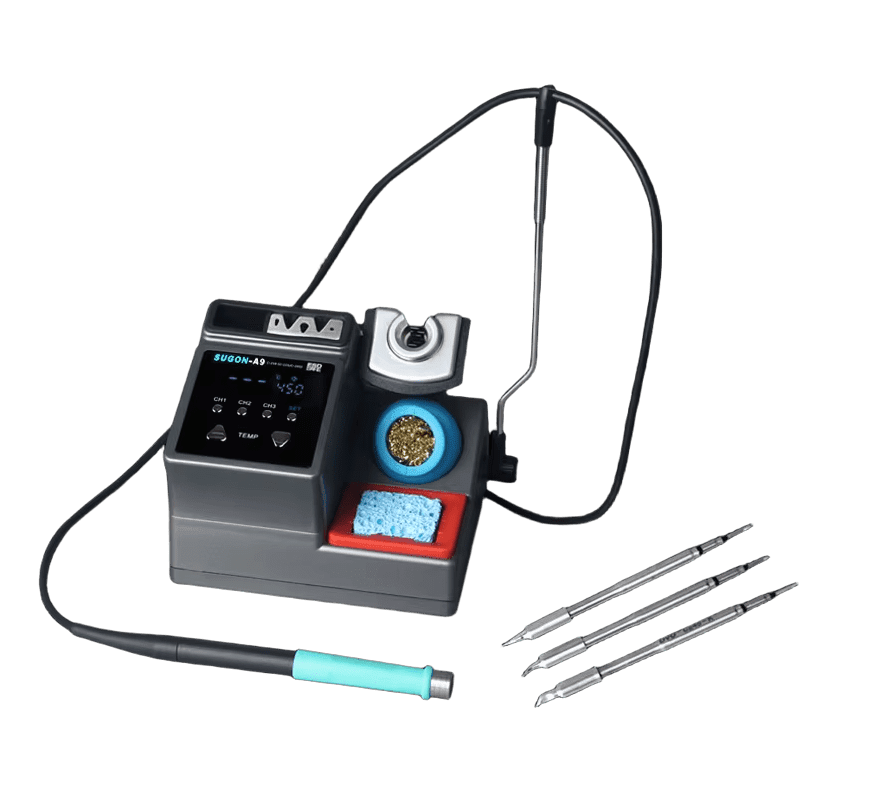
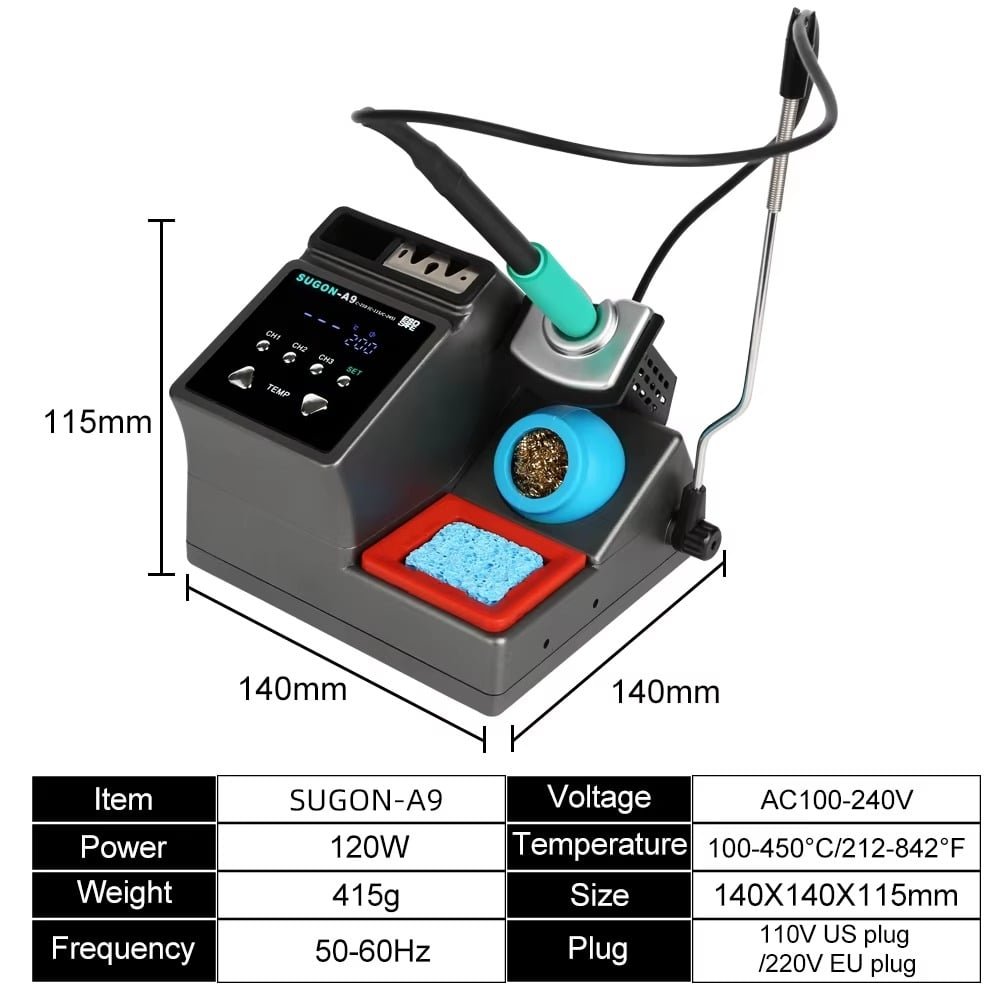
Looking for professional-grade soldering with instant heat? The SUGON A9 delivers 120W of power with JBC-compatible cartridge technology. It heats from standby to working temperature in roughly 2 seconds.
This station uses cartridge-style tips where the heater and sensor sit inside the cartridge itself. That design creates faster thermal response than traditional soldering irons with separate heating elements. You get JBC-level performance without the £400+ price tag.
At a Glance
| Performance | Convenience |
|---|---|
| 120W maximum power output | 3 memory channel presets |
| 100°C – 450°C temperature range | 4 standby temperature options |
| ~2-second heat-up from standby | Auto-sleep with metal ring detection |
| PID temperature control | °C/°F conversion |
| Real-time temperature compensation | Key lock function |
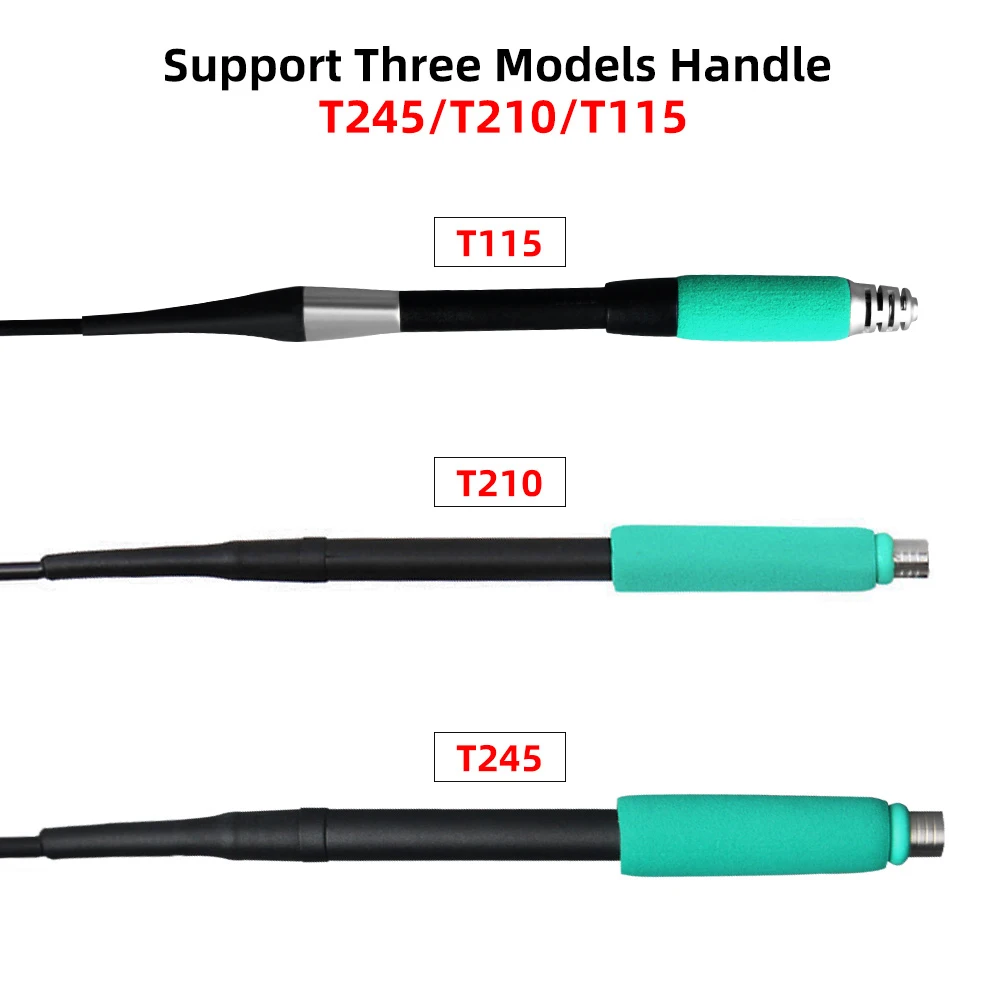
✓ Compatible with JBC-style C245, C210, and C115 cartridges ✓ Available in T245, T210, or T115 configurations ✓ Each configuration includes 3 cartridge tips
Why Cartridge Tips Change Everything
Traditional soldering irons use AC voltage to regulate temperature. The heater sits behind the tip, and heat travels through metal to reach your work. Temperature accuracy suffers. Set 350°C on a basic 936-series iron and actual tip temperature might reach 450°C.
The SUGON A9 is different:
| Traditional Iron | SUGON A9 Cartridge System |
|---|---|
| Heater behind the tip | Heater inside the cartridge |
| Slow thermal response | ~2-second heat-up |
| Temperature lag under load | Real-time compensation |
| Large error margin | PID precision control |
The heater and temperature sensor sit inside the cartridge itself. High-speed PID monitoring corrects temperature in real time.
Set 350°C → Get 350°C
Even when working on thermal pads that would drag down a conventional iron. Temperature compensation activates automatically during soldering. When heat transfers to your workpiece, the station detects the drop and compensates instantly.
Choose Your Configuration
The SUGON A9 is available in three configurations. Each includes the same base station with a different handle and matching cartridge set.
SUGON A9 with T245 Handle
Best for: General bench work, home appliance repair, computer motherboards, console repairs
The T245 handle with C245 cartridges delivers maximum 120W power. It handles large solder joints, ground planes, shield cans, and HDMI port replacements. The larger cartridge size stores more thermal energy for demanding joints.
Choose T245 if you: → Repair gaming consoles → Work on laptop motherboards → Need one setup that handles most tasks → Deal with large ground connections regularly
The T245 covers large and small solder joints, though the cartridge size makes ultra-fine work more difficult.
SUGON A9 with T210 Handle
Best for: Mobile phone repair, precision SMD work, small electronics, car remote controls
The T210 handle with C210 cartridges offers a compact grip for precision work. It handles IC sockets, fine-pitch QFP and SOIC packages, small flying wires, and medium solder joints.
Choose T210 if you: → Repair mobile phones → Work on small electrical appliances → Do frequent SMD rework → Need precision with decent thermal power
The T210 balances precision with enough thermal power for most components.
SUGON A9 with T115 Handle
Best for: Microscope-level micro-repair, ultra-fine circuits, multi-layer board work
The T115 handle with C115 cartridges is designed for the smallest work. It handles 0402 and 0201 components, complex flying wires, tiny test pads, and delicate multi-layer board repairs.
Choose T115 if you: → Do specialised micro-soldering under magnification → Work on phone board component-level repair → Need minimal thermal footprint → Handle ultra-fine circuits regularly
The T115 excels where access and precision matter most.
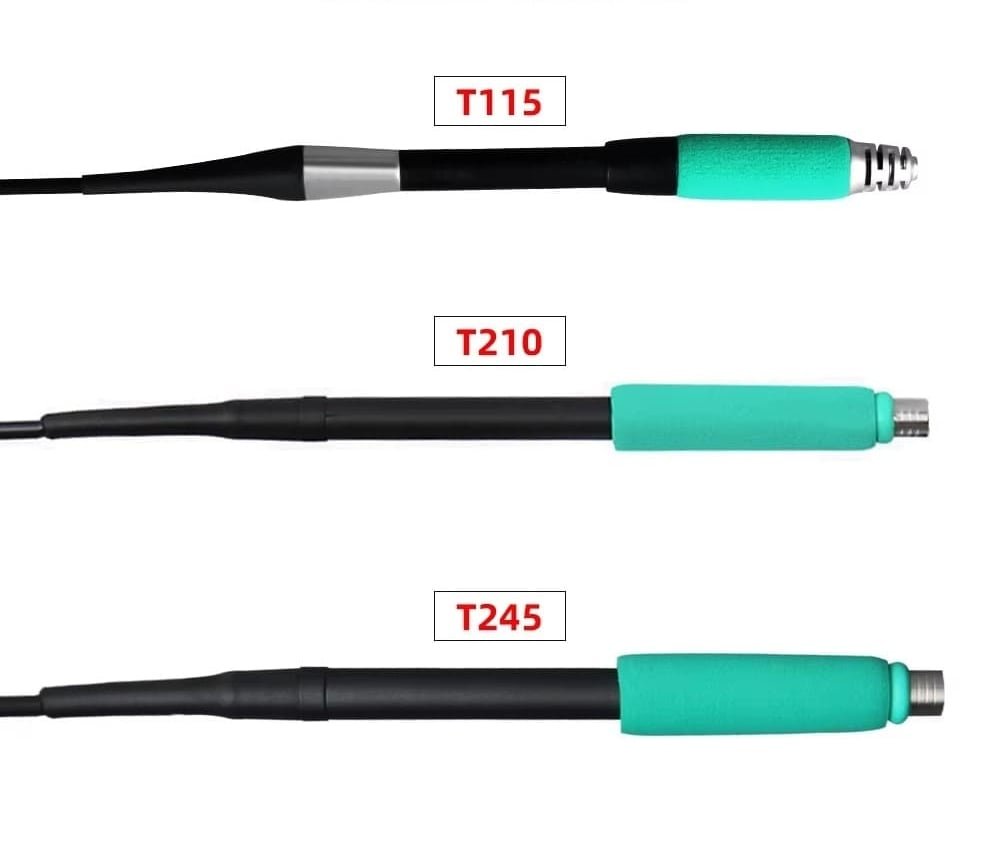
Quick Selection Guide
| Configuration | Primary Use | Solder Joint Size |
|---|---|---|
| T245 | General bench work, consoles, motherboards | Large to medium |
| T210 | Phone repair, SMD work, small electronics | Medium to small |
| T115 | Microscope work, ultra-fine circuits | Tiny to micro |
Not sure? Start with T245. It covers 80% of typical bench work.
Included Cartridge Tips
Each configuration includes three cartridge tips in shapes suited to different tasks:
| Tip | Shape | Best For |
|---|---|---|
| I Tip | Chisel/Cutter | Drag soldering, larger joints, efficient heat transfer |
| IS Tip | Small Chisel | Medium joints, general-purpose work, tighter spaces |
| K Tip | Pointed/Conical | Tiny joints, flying wires, precise work between pins |
All three tip shapes come in the cartridge size matching your selected handle (C245, C210, or C115).
What You Can Repair and Build
PCB Repair Fast heat recovery handles circuit board jobs efficiently. Ground planes and thermal pads won’t slow you down. Fix laptop motherboards, gaming consoles, and industrial control boards.
Console Repairs Replace HDMI ports on PlayStation 5 and Xbox Series X. Reflow APU connections. Swap charging ports on controllers. The 120W thermal power handles large ground connections.
Mobile Phone Repair The T210 and T115 configurations excel at phone board work. Access tiny components with minimal thermal footprint. Replace charging ICs, audio codecs, and power management chips.
Arduino and ESP32 Projects One station covers everything from prototype shields to finished builds. The memory presets let you dial in settings for different components and solder types.
Custom Keyboards Solder switches quickly with consistent heat. The fast thermal recovery keeps up with high-volume switch installation on hot-swap PCBs.
Three Memory Channels
Stop adjusting temperature every time you switch tasks. Store three presets and recall any with a single button press.
| Action | Function |
|---|---|
| Short press (1 second) | Recall stored temperature |
| Long press (3 seconds) | Store current temperature |
Example Setup:
| Channel | Temperature | Use Case |
|---|---|---|
| CH1 | 320°C | Leaded solder work |
| CH2 | 365°C | Lead-free soldering |
| CH3 | 380°C | Ground plane joints |
No more scrolling through menus when you change tasks.
Four Standby Temperature Options
Choose from four preset standby temperatures when the iron rests in the holder:
| Setting | Behaviour | Best For |
|---|---|---|
| 0°C | Completely off | End of session, maximum tip protection |
| 150°C | Low standby | Extended breaks, maximum tip life |
| 180°C | Medium standby | Balanced protection and wake-up speed |
| 200°C | High standby | Frequent use, fastest wake-up |
Lower standby settings extend cartridge life. Higher settings mean faster return to working temperature. Choose based on your work rhythm.
Auto-Sleep Protection
The handle includes a dormant metal ring. Place the iron in the stand and the station enters sleep mode automatically—no delay.
What auto-sleep delivers:
→ Lower standby temperature reduces tip oxidation → Cartridges last longer → Energy savings during idle periods → ~2-second wake-up when you lift the iron
Protection without inconvenience. Your investment stays protected while you check references, position components, or step away briefly.
Built for Precision Work
Temperature Compensation The station monitors tip temperature during soldering and compensates automatically. Your tip stays at the set temperature throughout the joint—even on demanding pads.
Celsius/Fahrenheit Conversion Switch between °C and °F display to match your preference or follow repair guides from different regions.
Key Lock Function Lock your temperature settings to prevent accidental changes during work. Essential in shared workshop environments.
Buzzer Control Turn audio feedback on or off based on your preference.
New Cartridge Break-In
When using a new soldering cartridge for the first time:
- Insert the new cartridge
- Heat for 5 minutes before starting work
- This break-in period improves temperature stability
- Extends overall cartridge life
Pro Tip: Geometry Before Temperature
Struggling with a stubborn joint? Try a larger tip before raising temperature.
| Approach | Result |
|---|---|
| Increase temperature | Faster tip oxidation, shorter cartridge life |
| Use larger tip geometry | Better heat transfer at same temperature |
A chisel tip transfers heat better than a conical at the same setting. Choose the right geometry first, then adjust temperature only if needed.
For precise calibration, consider adding the S-191 soldering iron temperature calibrator. Professional repair work requires accurate temperature verification, not guesswork.
Technical Specifications
| Specification | Value |
|---|---|
| Power Output | 120W (MAX) |
| Input Voltage | AC 220V |
| Frequency | 50-60Hz |
| Temperature Range | 100°C – 450°C (212°F – 842°F) |
| Temperature Control | High-precision PID regulation |
| Memory Channels | 3 presets |
| Standby Presets | 4 options (0°C, 150°C, 180°C, 200°C) |
| Heat-Up Time | ~2 seconds from standby |
| Compatible Cartridges | JBC-style C245, C210, C115 |
What’s in the Box
| Quantity | Item |
|---|---|
| 1x | SUGON A9 base station |
| 1x | Handle (T245, T210, or T115 as selected) |
| 3x | Soldering cartridges (I, IS, K tips in matching size) |
| 1x | Iron stand with sleep sensor |
| 1x | Power cable |
Cartridge Compatibility
The SUGON A9 works with JBC-style C245, C210, and C115 cartridges. Most third-party and genuine JBC cartridges fit without issues.
Note: The C115 system has more compatibility variations between manufacturers. Always check cartridge type matches your handle before purchasing replacements.
Frequently Asked Questions
Is the SUGON A9 compatible with genuine JBC cartridges? Yes. Most third-party and genuine JBC cartridges fit the T245 and T210 handles without issues. The C115 system has more compatibility variations—always verify before purchasing.
How long does the SUGON A9 take to heat up? Approximately 2 seconds from standby mode. Cold start takes slightly longer. The cartridge design places the heater directly at the tip for rapid thermal response.
What temperature range does the SUGON A9 support? 100°C to 450°C with precise PID control. Most general soldering happens between 300°C and 380°C. Lead-free solder typically requires 350°C to 380°C.
Which handle should I buy first? Start with T245. It covers 80% of typical bench work including through-hole soldering, connectors, and ground plane joints. Add T210 for frequent fine-pitch SMD work. Reserve T115 for microscope-level micro-soldering only.
Does the SUGON A9 have automatic sleep mode? Yes. The station enters sleep mode when you place the iron in the holder. Temperature lowers to reduce oxidation. The iron returns to working temperature almost instantly when lifted.
How do I extend cartridge tip life? Keep the tip tinned when idle. Use brass wool instead of abrasive sponges. Let auto-sleep activate between tasks. Choose proper tip geometry rather than increasing temperature for difficult joints.
Can I use the SUGON A9 for lead-free soldering? Yes. The 120W power output and fast thermal recovery handle lead-free requirements easily. The PID control maintains stable temperature even on demanding joints.
What Makers Are Saying
“Upgraded from a Hakko FX-888D. The heat recovery difference is night and day. Ground planes that used to fight me now take solder instantly.”
“Started doing mobile phone repairs as a side hustle. The T115 handle is perfect for the tiny components on phone boards. Paid for itself in the first month.”
Unbox and first impresions
Frequently Asked Questions
Is the SUGON A9 compatible with genuine JBC cartridges?
The SUGON A9 works with JBC-style C245, C210, and C115 cartridges. Most third-party and genuine JBC cartridges fit the T245 and T210 handles without issues. The C115 system has more compatibility variations between manufacturers. Always check handle connector type before purchasing cartridges.
How long does the SUGON A9 take to heat up?
The station reaches working temperature in approximately 2 seconds from standby mode. Cold start takes slightly longer. The cartridge design places the heater directly at the tip, which creates this rapid thermal response.
What temperature range does the SUGON A9 support?
The station operates between 200°C and 450°C with precise PID control. Most general soldering work happens between 300°C and 380°C. Lead-free solder typically requires temperatures around 350°C to 380°C.
Which handle should I buy first for the SUGON A9?
Start with the T245 handle. It covers 80% of typical bench work including through-hole soldering, connectors, and ground plane joints. Add T210 later if you do frequent fine-pitch SMD work. Reserve T115 for microscope-level micro-soldering only.
Does the SUGON A9 have automatic sleep mode?
Yes. The station enters sleep mode when you place the iron in the holder. This lowers tip temperature to reduce oxidation. The iron returns to working temperature almost instantly when lifted from the stand.
How do I extend cartridge tip life on the SUGON A9?
Keep the tip tinned when idle. Use brass wool instead of abrasive sponges for cleaning. Let the auto-sleep function activate between tasks. Choose proper tip geometry rather than increasing temperature for difficult joints.
Can I use the SUGON A9 for lead-free soldering?
Yes. The 120W power output and fast thermal recovery handle lead-free solder requirements. Lead-free alloys need higher temperatures and more heat input. The PID control maintains stable temperature even on demanding joints.
What power supply does the SUGON A9 need?
The station runs on standard mains power 220V.