

Soldering Tweezers
Soldering Tweezers
Soldering tweezers combine precision handling with direct heat application for SMD component work. These specialised tools grip tiny surface-mount parts while simultaneously heating both connection points, enabling fast and accurate placement on PCBs. Essential for phone repairs, microelectronics assembly, and any project involving 0402, 0603, or larger SMD components that demand control beyond what standard irons provide.
Showing all 3 results
-
-
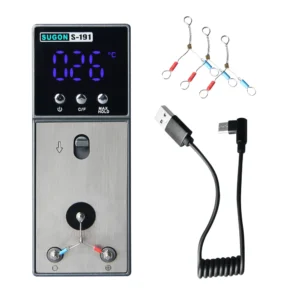
Original price was: £59.00.£44.50Current price is: £44.50.Take control of your soldering accuracy with instant tip temperature...Add to cart
-
Original price was: £54.90.£45.50Current price is: £45.50.Remove SMD components cleanly by heating both ends simultaneously. The...Add to cart

SMD Soldering Made Simple
Soldering tweezers deliver heat through their conductive tips, melting solder on both sides of a component simultaneously. This dual-heating approach eliminates the awkward juggling act of holding a component with one hand while applying an iron with the other—you grip the part with the tweezers, position it precisely, and heat both pads at once.
The technique transforms SMD rework from frustrating to efficient. Removing components becomes straightforward when both solder joints melt together, allowing you to lift resistors, capacitors, and small ICs without damaging pads or traces. Installation follows the same principle—apply solder paste or flux to the pads, place the component with the heated tweezers, and the part self-aligns as surface tension pulls it into position.
Phone repair technicians rely on soldering tweezers for replacing charging port components, small capacitors, and connectors. Custom keyboard builders use them for switch-mounted LEDs and surface-mount diodes. Anyone working with modern electronics encounters SMD parts, making these tweezers an essential complement to your soldering station setup.
Temperature Control and Tip Options
Quality soldering tweezers feature adjustable temperature control, allowing you to match heat settings to component size and solder type. Small 0402 resistors need less heat than larger electrolytic capacitors or shielded connectors. Digital displays show real-time temperature, typically ranging from 200°C to 450°C, giving you the same precision control as a dedicated soldering iron.
Interchangeable tips expand capability across different component types. Narrow pointed tips access tight spaces between components on dense PCBs. Wide flat tips spread heat evenly across larger parts like QFN packages or multi-pin connectors. Angled tips provide better visibility when working under microscopes or with magnification.
Some models integrate directly with existing hot air stations or multi-function soldering systems, sharing power supplies and control units. Standalone tweezers offer portability and dedicated workspace for technicians who primarily focus on SMD work. Consider your component sizes, board density, and how tweezers fit into your existing tool ecosystem when selecting a model.
Professional Techniques for Clean Results
Proper tweezer technique prevents lifted pads and damaged components. Apply flux to both solder joints before heating—this lowers the surface tension and helps solder flow cleanly. Heat both joints simultaneously until solder melts, then lift gently. Rushing causes pads to separate from the board substrate, especially on older or heat-damaged PCBs.
For installation, pre-tin both pads with a small amount of solder using your standard soldering iron. Position the component with the tweezers, apply heat, and watch the solder reflow to secure both connections. The part will shift into alignment as solder wets the pads—don’t fight this movement, as surface tension naturally centers the component.
Keep tip surfaces clean and tinned just like standard soldering iron tips. Oxidised or dirty tweezer tips transfer heat poorly, requiring higher temperatures that risk component damage. Use brass wool or tip cleaner regularly, and apply fresh solder to the tips between uses. Store tweezers with protective caps to prevent tip damage and maintain their precision geometry for accurate component gripping.
Showing all 3 results